4. Git 可视化版本比较
在使用 git diff 比较版本差异时,提示的字符不宜阅读。我们可以使用 git difftool 命令代替 git diff。 git difftool 可以启用提前设置好的可视化的比较软件进行比较,也可以使用 -t 选项临时设置比较软件。
使用 git difftool --tool-help 可以查询你当前版本的 git 所支持的基于图形的比较软件,如下所示:
weimz@mzstudio:~$ git difftool --tool-help
'git difftool --tool=<tool>' may be set to one of the following:
        meld             Use Meld (requires a graphical session)
        vimdiff          Use Vim

The following tools are valid, but not currently available:
        araxis           Use Araxis Merge (requires a graphical session)
        bc               Use Beyond Compare (requires a graphical session)
        bc3              Use Beyond Compare (requires a graphical session)
        bc4              Use Beyond Compare (requires a graphical session)
        codecompare      Use Code Compare (requires a graphical session)
        deltawalker      Use DeltaWalker (requires a graphical session)
        diffmerge        Use DiffMerge (requires a graphical session)
        diffuse          Use Diffuse (requires a graphical session)
        ecmerge          Use ECMerge (requires a graphical session)
        emerge           Use Emacs' Emerge
        examdiff         Use ExamDiff Pro (requires a graphical session)
        guiffy           Use Guiffy's Diff Tool (requires a graphical session)
        gvimdiff         Use gVim (requires a graphical session)
        kdiff3           Use KDiff3 (requires a graphical session)
        kompare          Use Kompare (requires a graphical session)
        nvimdiff         Use Neovim
        opendiff         Use FileMerge (requires a graphical session)
        p4merge          Use HelixCore P4Merge (requires a graphical session)
        smerge           Use Sublime Merge (requires a graphical session)
        tkdiff           Use TkDiff (requires a graphical session)
        winmerge         Use WinMerge (requires a graphical session)
        xxdiff           Use xxdiff (requires a graphical session)

Some of the tools listed above only work in a windowed
environment. If run in a terminal-only session, they will fail.
上述显示当前可以直接设置并使用的是 meld 和 vimdiff,支持的比较软件有 Araxis Merge、Beyond Compare 等。
git difftool 命令
作用: 同 git diff 一样,它会在图形用户界面启动相应程序进行比较
命令格式
git difftool [选项] [提交1] [提交2] [--] [路径]
常用选项
-t <图形工具启动命令>--staged 或 --cached示例:
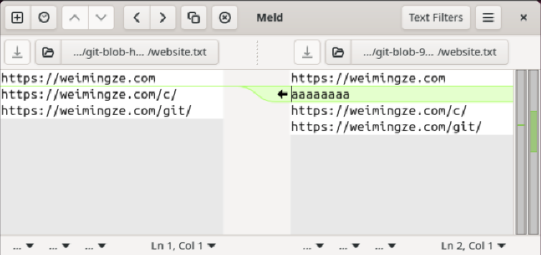
1、 使用 meld 比较暂存区和 HEAD 之间的差别:git difftool --staged -t meld
执行结果如下:
ze@mzstudio:~/my_project$ git difftool -t meld --staged

Viewing (1/1): 'website.txt'
Launch 'meld' [Y/n]? y
图形用户界面如下:
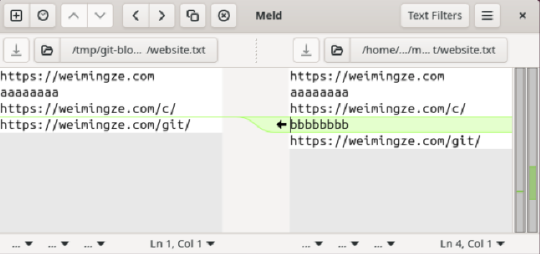
2、 使用 meld 比较工作区和暂存区 之间的差别:git difftool -t meld
执行结果如下:
weimz@mzstudio:~/my_project$ git difftool -t meld

Viewing (1/1): 'website.txt'
Launch 'meld' [Y/n]? y
图形用户界面如下:
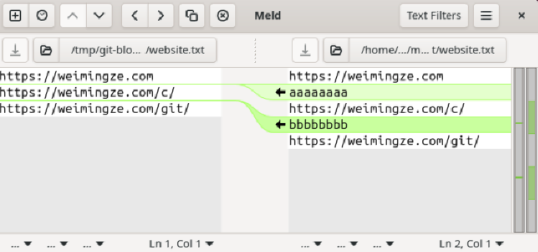
3、 使用 meld 比较工作区和 HEAD 之间的差别:git difftool HEAD -t meld
执行结果如下:
weimz@mzstudio:~/my_project$ git difftool HEAD -t meld .

Viewing (1/1): 'website.txt'
Launch 'meld' [Y/n]? y
图形用户界面如下:
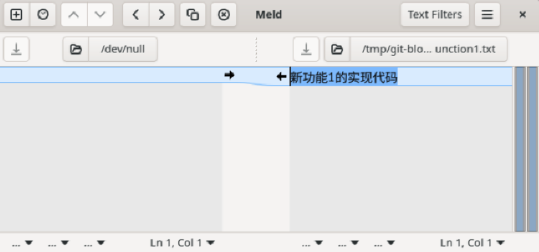
4、 使用 meld 比较 9d3b213 和 8e7f7c7 之间的差别:git difftool 9d3b213 8e7f7c7 -t meld 或 git difftool HEAD^1 HEAD^2 -t meld
执行结果如下:
weimz@mzstudio:~/my_project$ git difftool HEAD^1 HEAD^2 -t meld

Viewing (1/3): 'function1.txt'
Launch 'meld' [Y/n]? y

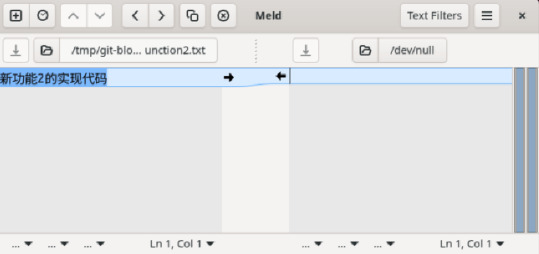
Viewing (2/3): 'function2.txt'
Launch 'meld' [Y/n]? y

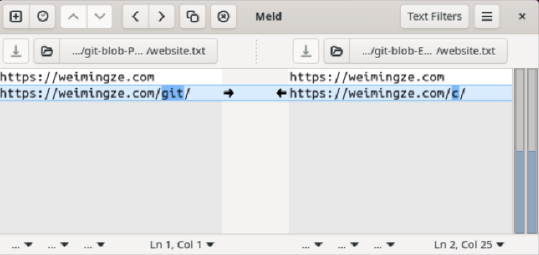
Viewing (3/3): 'website.txt'
Launch 'meld' [Y/n]? y
上面会提示三次是否打开比较,输入 y 后确认打开则会打开 meld 进行比较。
图形用户界面如下:
第 1 次确认比较 function1.txt:
第 2 次确认比较 function2.txt:
第 3 次确认比较 website.txt:
实验:
- 下载 meld,下载地址: http://meldmerge.org/。
- 安装 meld。
- 设置 meld 为默认
git difftool的比较工具。